Building Maintenance Software
JobTrail runs your building work from one place — the weekly round, the urgent call from the property manager, the access permit for the site, and the statement at month end. Crews, payroll, and vans are built in.
14-day free trial · No credit card required





Join 14,000+ pros

Built In AI Assistant
Powered by Google Gemini

Ongoing
Lobby lighting · 10:15 AM
Permit obtained · 4 of 9 scope lines done
15+ hrs
Saved Per Week
2X
Faster Invoicing
47%
Revenue Growth
14,000+
Pros On JobTrail
Built for the way building maintenance runs — from the security desk sign-in to the statement your property manager pays.
Based on JobTrail customer data, 2026.
Everything a building maintenance business needs
A building contract is a calendar, a permit file, an inspection sheet, and a stack of invoices per property. JobTrail keeps all of them in one system, and every plan includes every part.
Scheduling
Weekly rounds and same-day calls on one calendar, with team rows and conflict warnings before you save.
Customers
One property management company, many buildings — contact persons on the account, Property Details on each address.
Estimates
Price the out-of-contract repair, set an expiry, and turn the accepted estimate into an invoice in one click.
Invoicing
Invoice per visit or per building, record partial payments, and see which manager is past 60 days.
Job reports
Turn corridor and roof photos into a branded PDF the building owner can open from a share link.
Crews & teams
Color-coded crews per building cluster, dated roster changes when someone is out, leave flagged as you assign.
Assessments
Score a building walkthrough against a reusable checklist and get a percentage per visit, not an opinion.
Job conversations
A thread on every job and every building customer, with mentions and an inbox instead of a group text.
Incidents
Log a tenant complaint, a damaged door closer, or an injury with photos, and track it to closed.
How a building maintenance job runs in JobTrail
Take the request
The property manager calls about a dark stairwell. Log the request, flag it urgent, and hold a tentative block on the calendar so nobody double-books the crew.
Get through the door
JobTrail matches the building address to your permit process, lists the documents the security desk needs, and tracks the permit from Needed to Obtained.
Bill the building
The crew ticks off the scope in Field Mode, the manager signs the completion certificate, and the invoice rolls up to that customer’s statement.
The parts of a building week that eat your time

Know the paperwork before the van rolls
Define a work permit process for each building or campus — who issues it, which documents they ask for, and any fee. Book a job at that address and JobTrail matches the process to it, so the crew arrives with the right file.
- Issuer types: security desk, facility management, residents association
- Required-documents checklist: permit form, worker IDs, insurance, vehicle registration
- Permit status on the job: Needed, Requested, Obtained
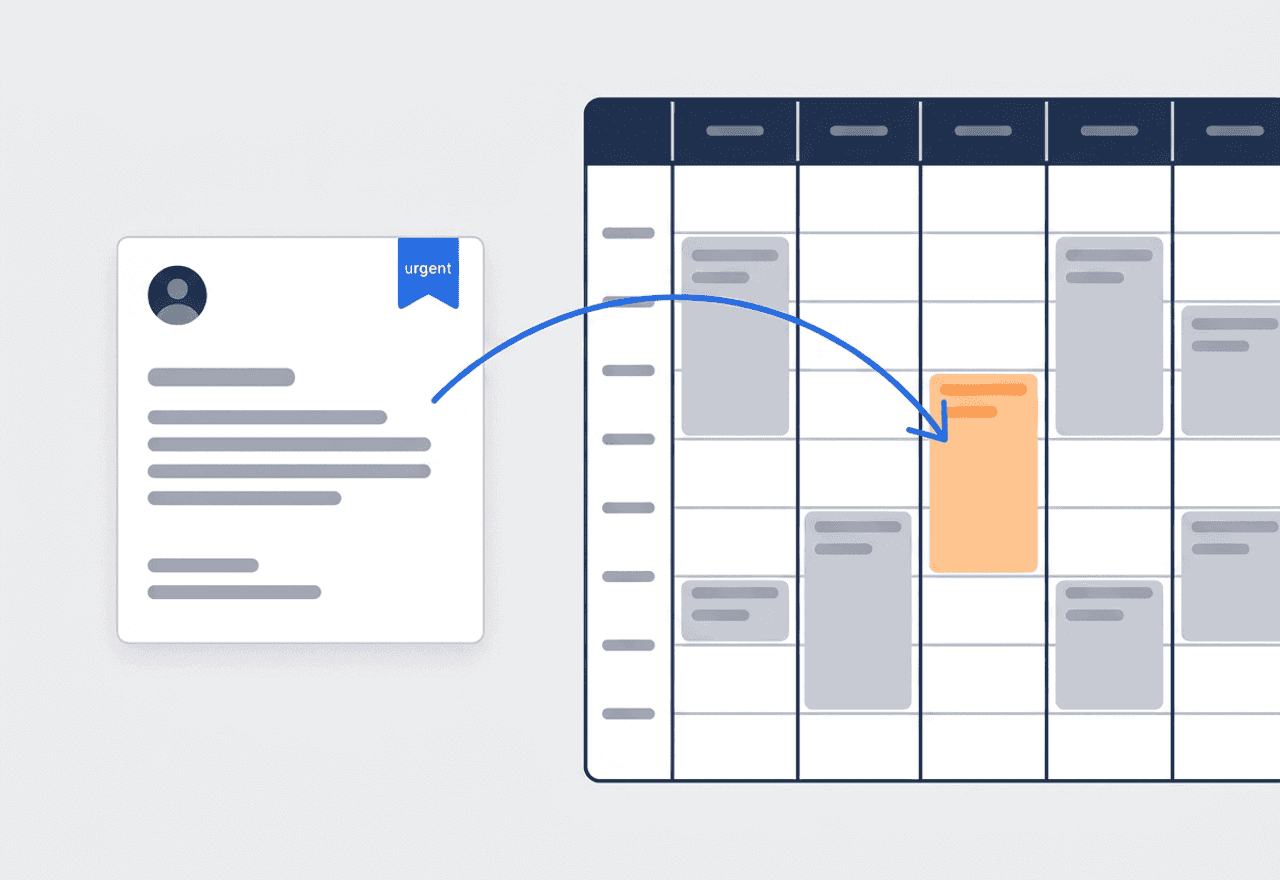
Weekly rounds and urgent calls, one calendar
Set the lighting round to Weekly, pick the weekdays, set the date range, and every visit lands on the calendar. When a manager calls with a leak, log the request and hold an orange tentative block beside the planned work.
- Repeat On weekday picker for the round, with a start and end date
- Urgent requests hold a tentative block that blocks double-booking
- Schedule view shows every crew as its own row

Score every walkthrough the same way
Build an inspection template once — emergency lighting, door hardware, restroom fixtures, roof drains — each item with its own points. Run it on any visit and JobTrail totals the score and the percentage for that walkthrough.
- Reusable templates with a score per item and a total
- Percentage result per visit, with the crew that ran it
- Assessor, team, and date stamped on every assessment

One statement per manager, any date range
Every invoice for every building rolls up under the property management company. Pick a date range and JobTrail builds a statement with a running balance. Aging shows what sits past 30, 60, and 90 days.
- Customer statement with running balance across all invoices
- Aging breakdown: current, 30, 60, and 90+ days
- Partial payments and credits recorded against each invoice

The permit lives on the address, not in your inbox
Every building has its own gatekeeper — a security desk, a facility management office, a residents association. Each one wants a permit form, worker IDs, proof of insurance, or a vehicle registration before your crew gets a key. Set up that process once in JobTrail with its coverage area and document list. When you book a job at a matching address, JobTrail flags the permit and attaches the process to the job. You track it from Needed to Requested to Obtained. Property Details on the address hold the rest — loading dock hours, freight elevator, alarm contact — and the crew reads them in Field Mode.
- Permit processes auto-matched to a job by its address
- Documents checklist and fee tracked per building
- Access notes on the address, visible on the phone

Planned rounds and urgent calls share one calendar
A building contract is two kinds of work. The planned part is the round — lighting checks, filter swaps, door closers — that repeats week after week. The reactive part is the manager calling because a restroom is flooding. JobTrail puts both on the same calendar. Switch the round to Weekly, choose the weekdays and the contract dates, and the visits book themselves. Log the urgent call as a request, mark it urgent, and hold a tentative block that stops anyone booking over it. Convert it to a job when the crew is confirmed. Team rows in the Schedule view show which crew has room.
- Weekly rounds booked for the whole contract period
- Urgent requests hold an orange tentative block
- Team-row Schedule view for every crew at once

Scored inspections and one statement per manager
Property managers pay for evidence. An assessment template turns your walkthrough into a scored checklist — panel room, roof drains, emergency lighting, each with its own points. Run it, and JobTrail records the score, the percentage, the crew, and the assessor. Job photos tagged Before, During, After, and Final build the visual record, and a job report turns them into a branded PDF with a share link. At month end, the invoices for that customer roll into one statement with a running balance. Nobody has to hunt through email for what was billed for which building.
- Scored assessments from templates you reuse
- Photo-narrative PDF reports shared by expiring link
- Statement per customer with a running balance
“Every building we service has a different desk to clear before we can even park. Now the permit process is on the job the second I book it — my guys aren’t calling me from the loading dock asking what the guard wants.”

Andre Thompson
Owner, Thompson Building Services
Ready to run your building maintenance business from one place?
Start your free trial and set up one real building — permit process, weekly round, and the first statement. No credit card, and every module is switched on from day one.
14-day free trial · No credit card required
Beyond building maintenance scheduling — everything built in
AI Assistant
Powered by Google Gemini. Look up a job, create or update a customer, and ask about a photo — in plain English.
HR & Payroll
Employee records, leave that accrues itself, and a pay run in one grid.
Fleet Management
Assign vans to crews, log every service, and set service reminders.
Work Permits
Match permit requirements to the job address. Track the documents each issuer wants, through to approved.
What is building maintenance software?
The system a commercial building maintenance contractor runs its work on. The categories differ in how much of a building week they actually cover.
| What a building maintenance contractor runs on | SheetsCalendar + spreadsheets | Sched. onlyScheduling-only tools | JobTrailJobTrail |
|---|---|---|---|
| Access permits by addressIssuer, documents, and fee matched to the job | No | No | Yes |
| Weekly rounds plus urgent callsPlanned visits and tentative blocks on one calendar | No | Partly | Yes |
| Scored building inspectionsReusable templates with a percentage per visit | No | Partly | Yes |
| Statements per property managerRunning balance across every building invoice | No | Yes | Yes |
| Payroll, leave and attendancePeople on leave flagged as you build a crew | No | No | Yes |
| Vehicle maintenance and work permitsService reminders, permit paperwork by address | No | No | Yes |
Yes CoveredPartly Varies by productNo Not covered
Why coverage decides what you really pay
Most field service tools handle the calendar and the invoice. Permits, payroll, leave, and vehicle upkeep each turn into another subscription and another password. Add those together and you have the real price of the shortlist. JobTrail ships all of them in every plan, so the comparison is one number against one number, not one number against five.
Building maintenance is not one job type. In a single week a contractor might run a lighting round through three buildings, quote a door replacement, answer an urgent leak, and clear a security desk for the roof. Software that covers half of that week pushes the other half back onto a clipboard.
The building nobody wrote down
A tech resets a breaker in a panel room and never notes which panel. The next crew spends twenty minutes finding it. A property manager disputes an invoice and there are no photos of the fixture before you touched it. A new hire shows up at a loading dock without the worker IDs the guard asks for. None of those started as a repair problem. Each one is a record that was never written down.
Building contracts also come with a paper trail the property manager expects — a signed completion certificate for the lobby fixture, before-and-after photos of the roof drain, an inspection score for the quarter. When those live in a truck folder and three phones, the month-end statement turns into a hunt. Keeping the photos, the signature, and the invoice on the same job means the proof is there when the manager questions a line.
Building maintenance software questions, answered
The one that covers what a building contract actually involves without charging per module. Two techs serving four buildings and a fifteen-person operation across a downtown portfolio both need permits by address, a calendar that holds planned rounds and urgent calls, a scored inspection, and a statement per property manager. Smaller operations feel every extra app more. Compare the shortlist on what the whole stack costs, and on whether the crew can run their day from a phone in a stairwell.
You define a work permit process per building or coverage area — the issuer type (security desk, facility management, residents association, government authority), the required documents (permit form, worker IDs, insurance, vehicle registration), and any fee. When you book a job at a matching address, JobTrail flags the matching process. Apply it and the permit is tracked from Needed to Requested to Obtained. It does not submit the permit to the issuer for you; the process is your checklist and status tracker, not an online filing.
Yes. Set the round to Weekly, pick the weekdays with Repeat On, and set a start and end date. Every visit lands on the calendar and you review the full list before saving. Urgent calls come in as requests. Mark one urgent and hold a tentative block, shown in orange, that prevents anyone booking that crew over it. Convert the request to a job when the manager confirms. Note that only weekly repeats exist — a monthly or quarterly visit is a job with several time slots, one history.
Facility management software is built for the in-house team running one campus — space, assets, tenants. Property maintenance tools lean toward residential units and landlords. JobTrail is for the contractor who serves many buildings for many property managers. Each manager is a business customer with contact persons and several addresses. Each address carries its own permit process and property details. Each visit is a job with photos, a scope, and an invoice that rolls up to that customer’s statement.
Yes. Assessments are scored site-visit checklists built from reusable templates. Each item carries its own points; JobTrail totals the score and shows a percentage, stamped with the crew, the assessor, and the visit date. Use one template per building type or per contract, and name the building in the general comments. Three limits to know: assessments are not tied to a customer or address, they do not carry photos, and they do not flow into the PDF report builder. Take photos on the job itself and build the report from those.
Yes. Set the property management company up as a business customer with an address per building. Every invoice for every building sits under that customer. Pick a date range and JobTrail generates a statement with a running balance, and the aging breakdown shows what is past 30, 60, and 90 days. You download the statement as a PDF and send it your own way — JobTrail does not email it or offer online payment.
Yes. Property Details are custom fields on the address — alarm contact, freight elevator hours, panel room location — defined once in Settings and shown in Field Mode. Custom roles carry field visibility, so you can hide specific fields from a role rather than a whole module. A new-hire crew role can see the scope and the photos while the alarm code stays with your lead techs.
Yes — both come with every plan. Employee records, leave policies with accrual, and a payroll grid with unpaid leave already deducted are included. Approved leave is flagged in the crew builder before you assign. On the fleet side, each van has registration and insurance expiry alerts, a maintenance log against a parts and services catalog, service-due reminders, and OCR of maintenance invoices. There is no live GPS tracking.
Plans start at $39 a month for a solo operator and scale with your team. Every plan includes every feature — scheduling, jobs, estimates, invoicing, HR and payroll, fleet, permits, and the AI assistant. There are no add-on modules and nothing is locked behind a higher tier, so the price you see is for the whole platform. The tiers run Solo at $39 a month for one user, Team at $139 for up to five, Growth at $199 for up to ten, and Scale at $299 for up to fifteen, each with a 14-day free trial.
Yes. JobTrail offers a 14-day free trial with full access to every feature and no credit card required. Set up your customers, put a week of real jobs on the calendar, and send a live invoice before you decide.
Put your next building in JobTrail
Every feature, every plan. Set up a permit process, book a weekly round, and run a scored inspection — all inside the trial.
14-day free trial · No credit card required